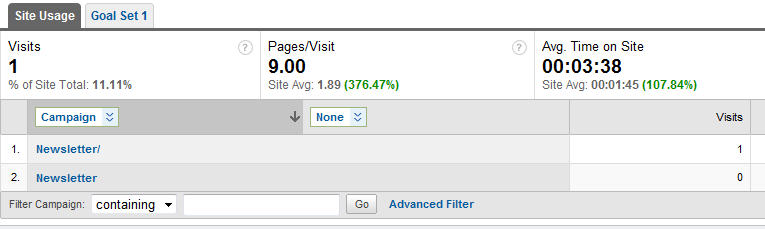
Google Analytics Reports
With Google Analytics reports you can measure the effectiveness of your sent messages.
How to start using Google Analytics
To start using Google Analytics you need a Google account first. You can sign up here.
Then, a few lines of JavaScript code are necessary in order to make Analytics work.
This block of code is unique for each website and is provided by Google. It is required to generate statistics on the page containing it.
A landing page is simply a specific webpage that a visitor views after clicking on a link in your email.
How to configure Google Analytics links in the program
- Create a new message or open the existing message.
- Click on the Advanced tab.
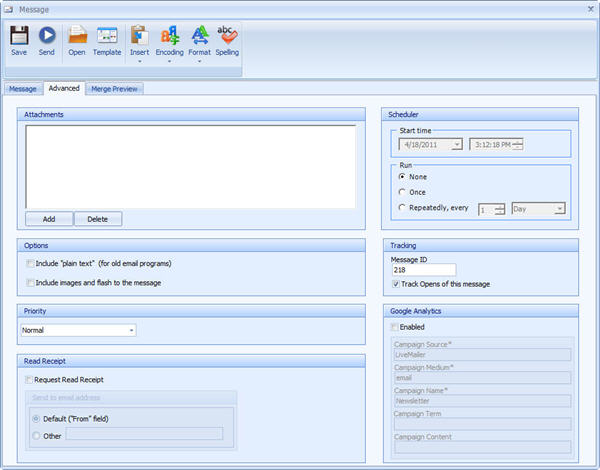
- Check the Enabled option and specify the parameters in the Google Analytics group.
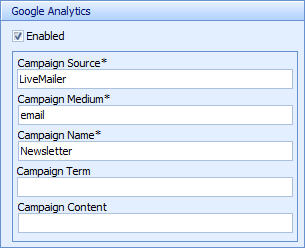
Campaign source: this variable allows you to separate out different types of email campaigns. We used the word LiveMailer so that when you examine statistics, you will see only LiveMailer email campaigns data.
Campaign medium: Email is the delivery vehicle you're using, so we suggest to leave the word email unchanged.
Campaign name: this parameter allows identifying a specific product promotion or email marketing campaign.
- Specify the URL of the landing page your recipient visits when clicking the linked text.

Google Analytics statistics
After your message is sent, you can check Google Analytics statistics in your account.